Stamps.com with ShipStation API provides access to USPS domestic and international shipping services for packages originating in the United States.
This guide provides developers with the details needed to build USPS shipping capabilities using a Stamps.com account into your ShipStation API workflows.
If you are using or plan to use the USPS services included with ShipStation API, rather than connecting your own Stamps.com account, see our USPS from ShipStation guide.
| Property | Type | Required? |
|---|---|---|
username | string | required |
password | string | required |
🎉 Update for Free Plans
Stamps.com and Endicia standalone accounts can now be connected on the ShipStation API Free plan for USA direct sellers.
You can connect a Stamps.com account using the POST method to the /v2/connections/carriers/ endpoint, or via the ShipStation dashboard.
For instructions on connecting Stamps.com via the dashboard, go to our Stamps.com help article.
carrier_code: stamps_com
POST /v2/connections/carriers/:carrier_code
POST /v2/connections/carriers/stamps_com HTTP/1.1
Host: api.shipstation.com
API-Key: __YOUR_API_KEY_HERE__
Content-Type: application/json

{
  "username": "myusername",
  "password": "123456789"
}
A successful connection will return a response with the carrier_id, which you'll use for any requests for this account going forward.
Use the rates endpoint to fetch estimated rates for services provided by Stamps.com. See our Calculate Shipping Costs page for details about rate shopping with ShipStation API.
The tables below provide the services available with Stamps.com, which include both USPS and GlobalPost services. Please note that carriers may update their available services at any time. To ensure you are always using valid services, you can use the GET /v2/carriers/:carrier_id/services endpoint at any time.
| Service | Transit Time | Maximum Dimensions (LxWxH) | Max Weight | Service Code |
|---|---|---|---|---|
| USPS Ground Advantage* | 2-5 days | 22" x 18" x 15" | 70 lbs | usps_ground_advantage |
| USPS Priority Mail | 1-3 days | varies by package type | 70 lbs | usps_priority_mail |
| USPS Priority Mail Express | 1-2 days | L x 2xW x H cannot exceed 108" | 70 lbs | usps_priority_mail_express |
| Media Mail | 2-9 days | L x 2xW x H cannot exceed 108" | 70 lbs | usps_media_mail |
IMPORTANT: USPS International Shipping Updates
International Mail Service Suspensions - Effective: March 3, 2026
The Postal Service™ is temporarily suspending acceptance of items destined to the following countries, due to logistics impacts resulting from the conflict in the Middle East. Please refrain from mailing items addressed to the countries listed here until further notice:
Algeria, Armenia, Bahrain, Djibouti, Eritrea, Iran, Iraq, Israel, Kuwait, Libya, Madagascar, Oman, Pakistan, Qatar, Seychelles, Syria, Tanzania, United Arab Emirates
HS Codes Required
As of September 1, 2025, the U.S. Postal Service will require all international commercial shipments to include a six-digit Harmonized System (HS) code on customs declarations for each item, regardless of mail class. The HS code system, created by the World Customs Organization, is used by customs authorities worldwide to classify goods and assess tariffs. This update aligns USPS mailing standards with new Universal Postal Union (UPU) regulations, also taking effect Sept 1, requiring all member countries to enforce six-digit HS codes for commercial goods.
For a full list of Harmonization Codes, use the Harmonized Tariff Schedule search.
| Service | Transit Time | Maximum Dimensions | Max Weight | Service Code |
|---|---|---|---|---|
| USPS First Class Mail Intl | 7-21 days | L x 2xW x H cannot exceed 136" | 64 oz | usps_first_class_mail_international |
| USPS Priority Mail Intl | 6-10 days | L x 2xW x H cannot exceed 108" | 70 lbs | usps_priority_mail_international |
| USPS Priority Mail Express Intl | 3-5 days | L x 2xW x H cannot exceed 108" | 70 lbs | usps_priority_mail_express_international |
NOTE: All international shipments using USPS First-Class Mail Int'l, Priority Mail Int'l, or Priority Express Int'l services will use Global Advantage Program labels by default.
GlobalPost international services are also available under the USPS from ShipStation carrier, as USPS is the official first-mile carrier for GlobalPost shipments originating in the US. For all GlobalPost services, transit time will vary depending on the destination country.
| Service | Max Weight | Service Code |
|---|---|---|
| GlobalPost Economy Intl | 4.4 lbs | globalpost_economy |
| GlobalPost Standard Intl | 70 lbs | globalpost_priority |
| GlobalPost Plus | 66 lbs | gp_plus |
| GlobalPost SmartSaver Economy Intl | 4.4 lbs | globalpost_economy_smart_saver |
| GlobalPost SmartSaver Standard Intl | 70 lbs | globalpost_priority_smart_saver |
| GlobalPost Plus SmartSaver | 66 lbs | globalpost_plus |
Stamps.com supports returns using any domestic service. Review the Return Labels page (ShipEngine guide) for details on creating return labels with ShipStation API.
The following carrier package types (ShipEngine guide) are available for USPS services. You can retrieve the current list dynamically using GET /v2/carriers/:carrier_id/packages.
| Package Name | API Code | Package Details |
|---|---|---|
| Medium Flat Rate Box | medium_flat_rate_box | Domestic and international |
| Flat Rate Envelope | flat_rate_envelope | Domestic and international |
| Small Flat Rate Box | small_flat_rate_box | Domestic and international |
| Large Flat Rate Box | large_flat_rate_box | Domestic and international |
| Flat Rate Padded Envelope | flat_rate_padded_envelope | Domestic and international |
| Flat Rate Legal Envelope | flat_rate_legal_envelope | Domestic and international |
Stamps.com supports adding carrier insurance to your shipments.
Review the Parcel Insurance page (ShipEngine guide) for details on adding shipment insurance with ShipStation API.
To comply with updated USPS API standards, all shipping label requests now require complete "From" and "Return To" address objects (including Street Address, City, State, and ZIP Code). Passing only a ZIP Code will result in a validation error.
Identify your integration method below and follow the corresponding solution:
Scenario A: Using the Web/UI Portal
Cause: Your shipping origin or return address is incomplete or differs from your primary account settings.
Solution: Navigate to your Account Settings and update your primary shipping and return addresses to include complete, permanent street details.
Scenario B: Using Direct API / SWSIM Integration
Cause: Your current API payload passes only a ZIP code instead of full address objects.
Solution: Update your integration payload to include complete From and Return To address objects (including Street Address, City, State, and ZIP) when requesting a label.
- Label sizes: 4" x 6"
- Label formats: PDF, ZPL
Label messages (ShipEngine guide) are supported for domestic shipments only. You can use all three label reference fields.
USPS does not support multi-package shipments (ShipEngine guide) at this time.
Stamps.com supports adding a custom label image to your labels. See our Create Custom Shipping Labels page (ShipEngine guide) for details.
Stamps.com supports voiding labels using ShipStation API, but it must be done within 28 days of label creation and the label cannot have been scanned by the USPS.
See our Void a Label page (ShipEngine guide) for details about voiding labels with ShipStation API.
USPS supports paperless labels (ShipEngine guide) with their services. This means you can generate a QR code for your customer, and they can take that QR code to be scanned at participating USPS locations, who will then print the label for them.
Review our paperless labels (ShipEngine guide) page for details on how to generate a QR code instead of a printable label. Use the paperless value for the display_scheme property.
Example QR Code 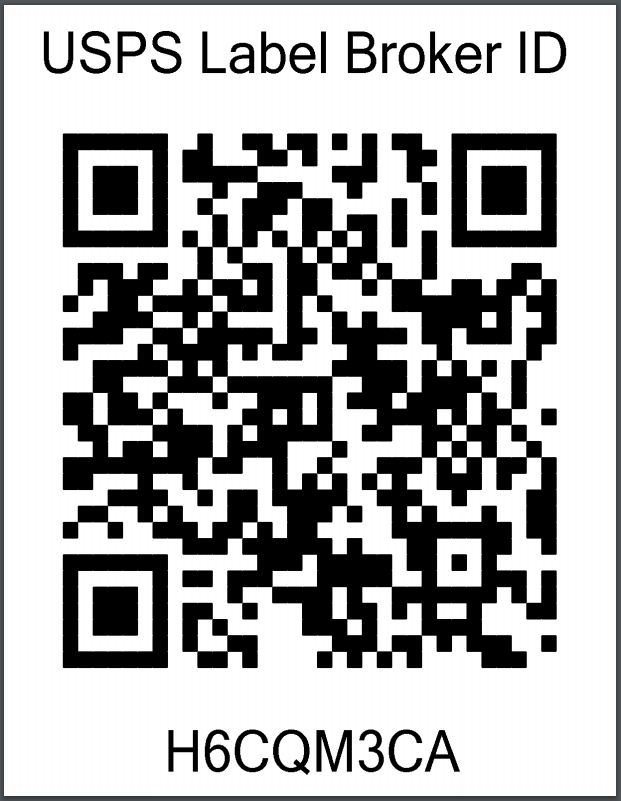
Using paperless labels might be a new experience for your customers. The USPS suggests sending out an email with the QR code label to help educate your customer on what they need to do to ship their package.
The email containing the QR Code should also include instructions on how to find participating USPS Post Offices by visiting https://tools.usps.com/find-location.htm?locationType=po&serviceType=lbroretail&address=18702, where the value of the address parameter is a customer's ZIP Code (such as 18702 in this example). The USPS Retail Associate at that location's Retail Counter will scan the QR Code, print the shipping label, affix it to the package, and provide a receipt.
If the customer has access to a printer, they may choose instead to print the label directly at https://tools.usps.com/label-broker.htm?LabelID=XYZZYPJK&zip=18702, where XYZZYPJK is the Label ID returned by ShipStation API, and 18702 is the ship_from postal_code.
Customs declarations for GlobalPost and GAP labels are submitted to the carrier electronically. See our International Shipments page (ShipEngine guide) for details about shipping internationally via ShipStation API.
NOTE: Action Required: New Zealand Border Levy Changes
Effective April 1, 2026, a new NZD $2.21 (+ GST) levy applies to low-value air freight consignments entering New Zealand. This levy is charged per consignment, not per item.
See the Shipping to New Zealand: Low Value Goods (LVG) Levy section in International Shipments (ShipEngine guide) for full details.
| Confirmation Type | API Code | Description |
|---|---|---|
| No confirmation | none | Default. When no delivery confirmation is requested. |
| Delivery | delivery | For general delivery confirmation. |
| Signature | signature | A signature is required to complete the delivery. |
| Adult Signature | adult_signature | An adult signature is required for the shipment to be delivered. |
| Adult Signature Restricted Delivery | adult_signature_restricted_delivery | An adult signature is required with restricted delivery. |
| Restricted delivery | restricted_delivery |
Signature and Adult Signature confirmation types are not supported for international shipments.
For more details about delivery confirmation and all available confirmation types, see the Delivery Confirmation guide.
Stamps.com supports certain advanced options (ShipEngine guide), which you can add to the shipment object when creating a shipment or label.
| Option | Name | Default Value | Description |
|---|---|---|---|
| Non Machinable | non_machinable | false | Indicates that the package cannot be processed through USPS sorting machines. |
| Dangerous Goods | dangerous_goods | false | Indicates this shipment contains dangerous goods |
To ensure you always have the most up-to-date information about a carrier's advanced options, use GET /v2/carriers/:carrier_id/options.
USPS supports creating manifests (called SCAN forms) via ShipStation API. If you plan to create a USPS SCAN form, you must manifest your day's shipments by 9pm local time.
See our Manifests page (ShipEngine guide) for more details about creating manifests with ShipStation API.
USPS supports scheduling pickups with ShipStation API. Pickups can only be scheduled one day in advance. For example, if you schedule a pickup on the 5th for the 7th, the pickup date scheduled by Stamps.com will be the 6th.
See our Schedule a Carrier Pickup page (ShipEngine guide) for more details about scheduling pickups using ShipStation API.
USPS does not support shipping to service points (ShipEngine guide).
ShipStation API's integration with Stamps.com supports receiving tracking updates. Review our Track a Package guides (ShipEngine guide) for details on tracking with the ShipStation API.
For damage, loss, or other issues with USPS shipments created using your Stamps.com account, you must file claims directly with USPS. ShipStation Support does not manage the claims process for shipments created through connected Stamps.com accounts.
To file a claim, visit the USPS Help Center for information about:
- Claim types and eligibility
- Required documentation
- Filing deadlines
- Claims process
USPS shipments created through your Stamps.com account require direct interaction with USPS for package intercept or redirect requests. ShipStation Support does not assist with USPS package intercept requests.
To request a package intercept or redirect for a USPS shipment, submit your request directly to USPS using their Package Intercept service.
NOTE: USPS charges a fee for Package Intercept services. Review the USPS Package Intercept page for current fees, eligibility requirements, and service limitations.
You can disconnect a Stamps.com carrier using the DELETE method with the /v2/connections/carriers/ endpoint, or via the ShipStation dashboard.
For instructions on disconnecting Stamps.com via the dashboard, go to our How do I disable a ShipStation carrier? help article.
DELETE /v2/connections/carriers/:carrier_code/:carrier_id
NOTE:
If you disconnect a carrier account and reconnect it, the account will have a new
carrier_idin ShipStation API.